
Journal

GRID: a simple visual cheatsheet for CSS Grid Layout

Now this is great. Even though I’m now using CSS Grid fairly regularly there are still aspects of the syntax that I hadn’t fully wrapped my head around. This visual representation really helps!

WorldWideWeb Rebuild

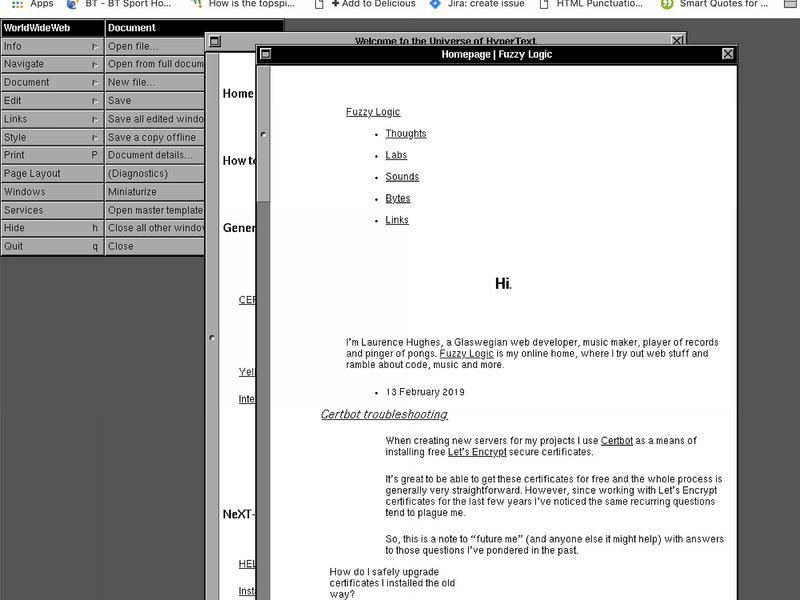
fuzzylogic.me rendered on the WorldWideWeb browser
fuzzylogic.me rendered on WorldWideWeb – not pretty, but readable!

This February, a team of intrepid developers and designers flew into CERN on a mission to recreate WorldWideWeb – the original web browser from 1990 – within a contemporary browser. This would allow all of us to “experience the rather humble origins of this transformative technology”.

What a fantastic project and fitting celebration of 30 years of the web.

And just for fun, see above for a screenshot of how fuzzylogic.me renders on WorldWideWeb.

Details and summary for no-JavaScript disclosure widgets

The fairly-recently added <details> element is a great, native HTML way to toggle content visibility.

<p>Lorem ipsum dolor sit amet.</p>

<details> <summary>System Requirements</summary> <p>Requires a computer running an operating system. The computer must have some memory and ideally some kind of long-term storage.</p> </details>

<p class="end">Remember: built-in beats bolt-on, bigly!</p>

<!-- <details> is great but there are a few gotchas:

  • Not totally flexible design-wise
  • Unsuitable for accordions with multiple sibling elements unless you add some JS
  • Unsupported in IE 11 (but content is still available) -->
:root {
font-size: 110%;
font-family: system-ui, -apple-system, "Segoe UI", Roboto, Helvetica, Arial,
  sans-serif, "Apple Color Emoji", "Segoe UI Emoji";


}

input, button { font-size: inherit; }

.end { margin-top: 2rem; }

Certbot Troubleshooting

When taking the DIY approach to building a new server, Certbot is a great option for installing secure certificates. However, sometimes you can run into problems. Here, I review the main recurring issues I’ve encountered and how I fixed them.

When creating new servers for my projects I use Certbot as a means of installing free Let’s Encrypt secure certificates.

It’s great to be able to get these certificates for free and the whole process is generally very straightforward. However, since working with Let’s Encrypt certificates over the last few years I’ve found that the same recurring questions tend to plague me.

This is a note to “future me” (and anyone else it might help) with answers to the questions I’ve pondered in the past.

How do I safely upgrade from the old LE system to Certbot?

For servers where you previously used the 2015/2016, pre-Certbot Let’s Encrypt system for installing SSL certs, you can just install Certbot on top and it will just work. It will supersede the old certificates without conflict.

How do I upgrade Certbot now that Let’s Encrypt have removed support for domain validation with TLS-SNI-01?

Essentially the server needs Certbot v0.28 or above. See Let’s Encrypt’s post on how to check your Certbot version and steps to take after upgrading to check everything is OK. To apply the upgrade I performed apt-get update && apt-get upgrade -y as root although depending on when you last did it this might be a bit risky as it could update a lot of packages rather than just the Certbot ones. It might be better to just try sudo apt-get install certbot python-certbot-apache.

To what extent should I configure my 443 VirtualHost block myself or is it done for me?

When creating a new vhost on your Linode, DigitalOcean (or other cloud hosting platform) server, you need only add the <VirtualHost *:80> directive. No need to add a <VirtualHost *:443> section, nor worry about pointing to LE certificate files, nor bother writing rules to redirect http to https like I used to. When you install your secure certificate, certbot will automatically add the redirect into your original file and create an additional vhost file (with extension -le.ssl.conf) based on the contents of your existing file but handling <VirtualHost *:443> and referencing all the LE SSL certificate files it installed elsewhere on the system.

How should I manage automated renewals?

There’s no longer any need to manually add a cron job for certiticate renewal. Auto-renewal of certificates is now handled by a cron job which comes bundled with the certbot package you initially install – in my case usually a certbot ppa package for Ubuntu 16.04 or 18.04. However you won’t find that cron job in the crontab for either your limited user, nor the root user. Instead, it is installed at a lower level (/etc/cron.d) and should just work unless you’ve done something fancy with systemd in your system which in my case is unlikely.

How can I tell if renewals are working and what should I do if they’re not?

If you notice that the SSL certificate for your domain is within 30 days of expiry and hasn’t yet auto-renewed, then you know that something has gone wrong with the auto-renewal process. You can test for problems by running sudo certbot renew --dry-run. You may find that there is, for example, a syntax error in your apache2.conf or nginx config file which needs corrected – not that I’ve ever been guilty of this, you understand…
Favicons and other icons (on MDN)

Here’s a useful reference from MDN to use when compiling your site’s favicon and other icons (apple touch etc) at the right sizes for your <head>.

Elijah – Ice 2 Go (Iridite)

Here’s the first track I had released, Ice 2 Go under my alias Elijah from the 2002 various artists EP Better by Design on Iridite Recordings. When I get the chance I’ll add more of my released tracks, some old sessions that never saw the light of day, and any new works-in-progress.

Play Video: Elijah – Ice 2 Go (Iridite)

On reflection this one was pretty naive and raw but I can live with that! I was 25 when I made it and listening to a lot of John Tejada, and you can definitely hear that influence alongside other typical Detroit Techno stylings.

I made it in Cubase with a combination of software and hardware. The main bassline sound came from NI Mercury, with an additional bassline from my Walforf Pulse. The drums were programmed in Attack and the main riff with its panning effects was also software-based. The pad and portamento/gliding lead part came from my Juno 106 and Nord Lead 2 respectively.

Fun fact: the name Ice 2 Go came from a night out in Amsterdam with label-boss Jason and the lovely Lydia during which we asked a bar for a bag of ice to take away to make caipirinhas. A mildly merry Jason first heard then signed the track that very night.

I remember that DJs like DJ 3000 and Nomadico/Dex from Underground Resistance played it. Closer to home I heard that Hudson Mohawke was a fan and played it at the Sub Club, while Jackmaster was good enough to showcase it in a “lesser-known gems” feature on Radio 1. And nice people who I respect like Mark still rate it, so that’s good enough for me.

W3C HTML Element Sampler

In all my years of spinning up “HTML Typographic Elements” lists or pages as a reference for designers, I didn’t realise that the W3C provide the very thing I needed in their HTML Element Sampler. These pages provide comprehensive dummy content covering all the main typographic elements which is really handy when designing a website’s typographic styles and pattern library.

State-based UI with vanilla JavaScript

My latest lab experiment is a little Lunch Picker coded in vanilla JavaScript. The idea was to create a simple, lightweight app which accepts user input and implements a State Based UI pattern. It re-renders the UI every time the data changes state, similar to the way React.js and Vue.js would but without the weight of any frameworks.

I was inspired by a great tutorial from Chris Ferdinandi which I implemented with my own twist.

Give it a whirl, view source if you’re interested, and get some help making that all-important call on what to have for lunch today!

Jazzology with Soweto Kinch (on BBC Four)

Loved this BBC documentary which traces jazz’s roots back to Congo Square in New Orleans, explores the origins of the word jazz, and explains the music’s cultural importance as a language – spoken first by slaves – for self-expression and representing community.

My favourite section was the interview with pianist Marcus Roberts in which he explained how jazz came from the blues and described blues music in terms of “dissonance that resolves” and “tension and release… just like life”.