Journal

Vanilla JS List

Here’s Chris Ferdinandi’s curated list of organisations which use vanilla JS to build websites and web apps.

You don’t need a heavyweight JavaScript framework, and vanilla JS does scale.

At the time of writing the list includes Marks & Spencer, Selfridges, Basecamp and GitHub.

(via @ChrisFerdinandi)

Bleep Mix #221 - Datassette (on Bleep.com)

Great DJ mix by one of my favourite electronic producers, Datassette.

This mix is all about that 160bpm+ energy that first inspired me to make music. Around 1996 — to me at least, with the advantages of teenage naîvety — it seemed like electronic music had burst into a whole new tempo range, where there were no rules and anything was possible - as long as it BELTS (which is still true). If you go beyond 200 BPM, you reach that zone where 16th notes start to dissolve into 32nds and your brain latches onto a whole new outer layer of rhythm, like a fractal or temporal shepard tone. There is still much to be discovered!

I listened to this one while walking through the Glasgow Necropolis during one of those eerily-quiet Covid-era days, and it provided a welcome shock to the system.

Source Serif 4

Here’s a nice demo page for Source Serif 4 which illustrates its versatility.

Source Serif is an open-source typeface for setting text in many sizes, weights, and languages. The design of Source Serif represents a contemporary interpretation of the transitional typefaces of Pierre-Simon Fournier. Additionally, Source Serif has been conceived as a friendly companion to Paul D. Hunt’s Source Sans.

Back when I first started using Source Sans Pro for text for my personal website, I tried pairing it with Source Serif for headings. It didn’t quite work for me then but the typeface seems to have undergone some changes in the interim and also now comes with a variable font option. I might give it another spin.

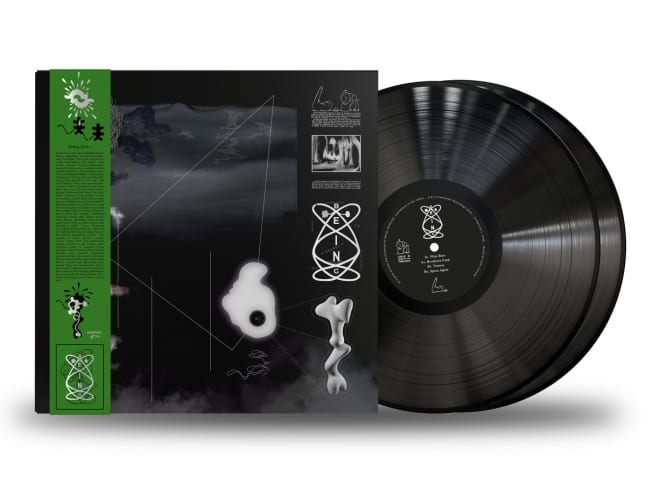
Being – Broxburn Funk

Being’s Broxburn Funk arrived in today’s post and it’s a thing of beauty.

Being – Broxburn Funk LP, on vinyl from Firecracker Records

Enjoying it now with a ☕️. Amazing work all round—music, sound, artwork, the lot. Big up @WeeDjs for the stellar tunes and if @firecracker_rec’s 50th is their last, then they’ve finished with a bang.

Grab a copy at Rubadub

Use CSS Clamp to create a more flexible wrapper utility (on Piccalilli)

Here’s Andy Bell recommending using CSS clamp() to control your wrapper/container width because it supports setting a preferred value in vw to ensure sensible gutters combined with a maximum tolerance in rem—all in a single line of code.

If we use clamp() to use a viewport unit as the ideal and use what we would previously use as the max-width as the clamp’s maximum value, we get a much more flexible setup.

The code looks like this:

.container {
  width: clamp(16rem, 90vw, 70rem);
  margin-left: auto;
  margin-right: auto;
}

This is pretty cool because I know from experience that coding responsive solutions for wrappers can be tricky and you can end up with a complex arrangement of max-width and media queries whilst still—as Andy highlights—not providing optimal readability for medium-sized viewports.

Using CSS Grid with minmax() is one possible approach to controlling wrappers however this article offers another (potentially better) tool for your kit.

It’s worth noting that Andy could probably have just used width: min(90vw, 70rem) here (as Christopher suggested) because setting the lower bound provided by clamp() is only necessary if your element is likely to shrink unexpectedly and a regular block-level element wouldn’t do that. The clamp approach might be handy for flex items, though.

(via @piccalilli_)

Music For Programming

Feel like I’m probably really late to discover this website, but here’s “Music for Programming” from Datassette. Hopefully this’ll be of use to fellow programmers who like music, although I daresay you can probably enjoy it if you’re a normal person too.

Through years of trial and error - skipping around internet radio stations, playing our entire music collections on shuffle, or just hammering single albums on repeat, we have found that the most effective music to aid prolonged periods of intense concentration tends to have a mixture of the following qualities: Drones, Noise, Fuzz, Field recordings, Vagueness (Hypnagogia), Textures without rhythm…

As both a programmer and big fan of Datassette (the creator/curator of this website), how did I not know about this sooner?! Anyway, plenty to dive into now.

(via @datassette)

Complete Guide to Source Sans Pro (on Beautiful Web Type)

At the time of writing, my personal website uses the typeface Source Sans Pro and has done for around two years. I already employ a number of its cool features however this lovely demo page provides further inspiration.

Source Sans Pro is a versatile typeface designed particularly for user interfaces. Its letterforms are slightly condensed allowing them to fit into tight spaces within a UI, and remain well-defined even at small sizes.

I might consider going back to using Source Serif Pro for headings again, too.

(via @stugoo)

Use Mac Zoom to show the text a screen reader gets

I picked up a good accessibility testing tip from my work colleague Max today.

On a Mac, if you open System > Accessibility > Zoom, you can enable “hover text”. This allows you to hold down command (cmd) and then whatever is under the mouse will be shown. This shows the same text that a screen reader sees so it’s good for checking if bits of the page respond to a screen reader.

Robb Owen - Independent Creative Developer

Definite “personal website goals” here in Robb’s beautiful online portfolio and blog.

From interaction design to scaleable design systems, single-page apps to something more experimental with WebGL. I help awesome people to build ambitious yet accessible web projects - the wilder, the better.

Robb combines beautiful typography and colours with fun and smooth animation… and the words ain’t half bad, either.

Inspirational work!

Accessible interactions (on Adactio)

Jeremy Keith takes us through his thought process regarding the choice of link or button when planning accessible interactive disclosure elements.

A button is generally a solid choice as it’s built for general interactivity and carries the expectation that when activated, something somewhere happens. However in some cases a link might be appropriate, for example when the trigger and target content are relatively far apart in the DOM and we feel the need move the user to the target / give it focus.

For a typical disclosure pattern where some content is shown/hidden by an adjacent trigger, a button suits perfectly. The DOM elements are right next to each other and flow into each other so there’s no need to move or focus anything.

However in the case of a log-in link in a navigation menu which—when enhanced by JavaScript—opens a log-in form inside a modal dialogue, a link might be better. In this case you might use an anchor with a fragment identifier (<a href="#login-modal">Log in</a>) pointing to a login-form far away at the bottom of the page. This simple baseline will work if JavaScript is unavailable or fails, however when JavaScript is available we can intercept the link’s default behaviour and enhance things. Furthermore because the expectation with links is that you’ll go somewhere and modal dialogues are kinda like faux pages, the link feels appropriate.

While not explicit in the article, another thing I take from this is that by structuring your no-JavaScript experience well, this will help you make appropriate decisions when considering the with-JavaScript experience. There’s a kind of virtuous circle there.